
Tint the whole screen – or just part of it – at the click of a button: a virtual coloured overlay for reading on a PC.
See the screen tinted
Pick a colour and strength to see how the virtual overlay tints everything on the screen. Try Part of screen to use the tint as a reading band, or Windows colours to change just the document background. Press Pause to stop the colours changing.
For many people with visual stress, text on a bright white screen can appear to shimmer, blur or move, and reading soon becomes tiring.
A coloured overlay can make text more comfortable to read. The ReadEZ Virtual Overlay brings the same benefit to the PC, tinting documents, web pages and other programs in the colour chosen during a ReadEZ assessment.
Drag the tinted band to move it, or drag its bottom edge to resize it. With the keyboard, use the arrow keys to move it and Shift + arrow keys to resize it.
Demonstration only. The colour that suits each patient best is identified during a ReadEZ assessment.
What is it?
Overlays and reading guides work well for printed text, but many patients with visual stress spend much of their day reading on a computer screen.
The ReadEZ Virtual Overlay lets them tint their own PC screen in the colour identified during their ReadEZ assessment – an ideal companion to overlays, clip-ons and coloured lenses.
Key features
- Tint the screen in the patient’s preferred colour at the click of a button
- Change the Windows text and background colours to any colour
- Or place a virtual overlay over everything behind it – PDFs, web pages and other programs
- Cover the whole screen, or size and move the overlay to cover just part of it
- Turn the overlay on and off instantly
- Works on most PCs running Windows 10 or later
Two ways to tint the screen
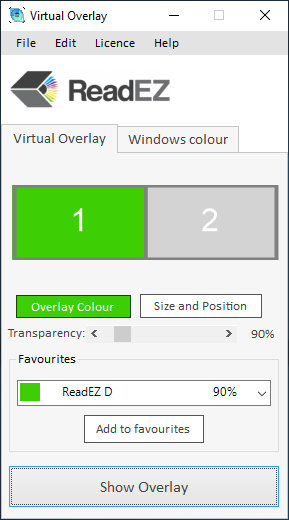
Option 1
Windows colours
For programs that use the standard Windows colours, set both the text and the background to any colour you like.
Option 2
Virtual overlay
Place a tinted overlay on the screen so that everything behind it is coloured – just like a real overlay. Ideal for PDFs, web pages and other programs that don’t use Windows colours.
Ordering
Please contact us for prices and to order the ReadEZ Virtual Overlay software.